reliure.schema
| copyright: |
|
|---|---|
| license: | ${LICENSE} |

Class
-
class
reliure.schema.Doc(schema=None, **data)¶ Bases:
dictDocument object
Here is an exemple of document construction from a simple text. First we define document’s schema:
>>> from reliure.types import Text, Numeric
>>> term_field = Text(attrs={'tf':Numeric(default=1), 'positions':Numeric(multi=True)})
>>> schema = Schema(docnum=Numeric(), text=Text(), terms=term_field)
Now it is how one can build a document from this simple text:
>>> text = """i have seen chicken passing the street and i believed
... how many chicken must pass in the street before you
... believe"""
Then we can create the document:
>>> doc = Doc(schema, docnum=1, text=text)
>>> doc.text[:6]
'i have'
>>> len(doc.text)
113
>>> doc["docnum"]
1
Then we can analyse the text:
>>> tokens = text.split(' ')
>>> from collections import OrderedDict
>>> text_terms =  list(OrderedDict.fromkeys(tokens))
>>> terms_tf = [ tokens.count(k) for k in text_terms ]
>>> terms_pos = [[i for i, tok in enumerate(tokens) if tok == k ] for k in text_terms]
and one can store the result in the field “terms”:
>>> doc.terms = text_terms
>>> doc.terms.tf.values()   # here we got only '1', it's the default value
[1, 1, 1, 1, 1, 1, 1, 1, 1, 1, 1, 1, 1, 1, 1]
>>> doc.terms.tf = terms_tf
>>> doc.terms.positions = terms_pos
One can access the information, for example, for the term “chicken”:
>>> key = "chicken"
>>> doc.terms[key].tf
2
>>> doc.terms[key].positions
[3, 11]
>>> doc.terms.get_attr_value(key, 'positions')
[3, 11]
>>> doc.terms._keys[key]
3
>>> doc.terms.positions[3]
[3, 11]
#TODO: la valeur de docnum doit être passer en argument de __init__
-
__init__(schema=None, **data)¶ Document initialisation
Warning
a copy of the given schema is stored in the document
Simple exemple:
>>> from reliure.types import Text, Numeric
>>> doc = Doc(Schema(titre=Text()), titre='Un titre')
Not that a “docnum” field is always present, i.e. it is added if not given in schema: >>> doc = Doc(docnum=”42”) >>> doc.docnum ‘42’
-
add_field(name, ftype, docfield=None)¶ Add a field to the document (and to the underlying schema)
Parameters: - name (str) – name of the new field
- ftype (subclass of
GenericType) – type of the new field
-
export(exclude=[])¶ returns a dictionary representation of the document
-
set_field(name, value, parse=False)¶ Set the value of a field
-
-
class
reliure.schema.DocField(ftype)¶ Bases:
objectAbstract document field
Theses objects are containers of document’s data.
-
static
FromType(ftype)¶ DocField subclasses factory, creates a convenient field to store data from a given Type.
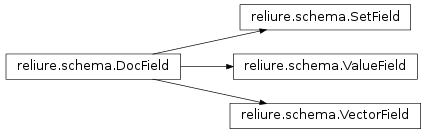
attribute precedence :
|attrs| > 0(multianduniqare implicit) => VectorFielduniq(multiis implicit) => SetFieldmultiandnot uniq=> ListFieldnot multi=> ValueField
Parameters: ftype (subclass of GenericType) – the desired type of field
-
__init__(ftype)¶ Parameters: ftype (subclass of GenericType) – the type for the field
-
export()¶ Returns a serialisable representation of the field
-
ftype
-
get_value()¶ return the value of the field.
-
parse(value)
-
static
-
exception
reliure.schema.FieldValidationError(field, value, errors)¶ Bases:
exceptions.ExceptionError in a field validation
-
__init__(field, value, errors)
-
-
class
reliure.schema.ListField(fieldtype)¶ Bases:
reliure.schema.DocField,listlist container for non-uniq field
usage example:
>>> from reliure.types import Text
>>> schema = Schema(tags=Text(multi=True, uniq=False))
>>> doc = Doc(schema, docnum='abc42')
>>> doc.tags.add('boo')
>>> doc.tags.add('foo')
>>> doc.tags.add('foo')
>>> len(doc.tags)
3
>>> doc.tags.export()
['boo', 'foo', 'foo']
-
__init__(fieldtype)
-
add(value)¶ Adds a value to the list (as append). convenience method, to have the same signature than
SetFieldandVectorField
-
append(value)
-
export()¶ returns a list pre-seriasation of the field
>>> from reliure.types import Text
>>> doc = Doc(docnum='1')
>>> doc.terms = Text(multi=True)
>>> doc.terms.add('rat')
>>> doc.terms.add('chien')
>>> doc.terms.add('chat')
>>> doc.terms.add('léopart')
>>> doc.terms.export()
['rat', 'chien', 'chat', 'l\xe9opart']
-
get_value()
-
parse(value)
-
set(values)¶ set new values (values have to be iterable)
-
-
class
reliure.schema.Schema(**fields)¶ Bases:
objectSchema definition for documents (
Doc). Class inspired from Matt Chaput’s Whoosh.Creating a schema:
>>> from reliure.types import Text, Numeric
>>> schema = Schema(title=Text(), score=Numeric())
>>> sorted(schema.field_names())
['score', 'title']
-
__init__(**fields)¶ Create a schema from pairs of field name and field type
For exemple:
>>> from reliure.types import Text, Numeric
>>> schema = Schema(tags=Text(multi=True), score=Numeric(vtype=float, min=0., max=1.))
-
add_field(name, field)¶ Add a named field to the schema.
Warning
the field name should not contains spaces and should not start with an underscore.
Parameters: - name (str) – name of the new field
- field (subclass of
GenericType) – type instance for the field
-
copy()¶ Returns a copy of the schema
-
field_names()
-
has_field(name)
-
iter_fields()
-
remove_field(field_name)
-
-
exception
reliure.schema.SchemaError¶ Bases:
exceptions.ExceptionError
-
class
reliure.schema.SetField(fieldtype)¶ Bases:
reliure.schema.DocField,setDocument field for a set of values (i.e. the fieldtype is “multi” and “uniq”)
usage example:
>>> from reliure.types import Text
>>> schema = Schema(tags=Text(multi=True, uniq=True))
>>> doc = Doc(schema, docnum='abc42')
>>> doc.tags.add('boo')
>>> doc.tags.add('foo')
>>> len(doc.tags)
2
>>> sorted(doc.tags.export())
['boo', 'foo']
-
__init__(fieldtype)
-
add(value)
-
export()
-
get_value()
-
parse(value)
-
set(values)
-
-
class
reliure.schema.ValueField(fieldtype)¶ Bases:
reliure.schema.DocFieldStores only one value
usage example:
>>> from reliure.types import Text
>>> schema = Schema(title=Text(), like=Numeric(default=45))
>>> doc = Doc(schema, docnum='abc42')
>>> # 'title' field
>>> doc.title = 'Un titre cool !'
>>> doc.title
'Un titre cool !'
>>> doc.get_field('title').export()
'Un titre cool !'
>>> doc.get_field('title').ftype
Text(multi=False, uniq=False, default=, attrs=None)
>>> # 'like' field
>>> doc.like
45
-
__init__(fieldtype)
-
export()
-
get_value()
-
set(value)
-
-
class
reliure.schema.VectorAttr(vector, attr)¶ Bases:
objectInternal class used to acces an attribute of a
VectorField>>> from reliure.types import Text, Numeric >>> doc = Doc(docnum='1') >>> doc.terms = Text(multi=True, uniq=True, attrs={'tf': Numeric()}) >>> doc.terms.add('chat') >>> type(doc.terms.tf) <class 'reliure.schema.VectorAttr'>
-
__init__(vector, attr)
-
export()
-
values()
-
-
class
reliure.schema.VectorField(ftype)¶ Bases:
reliure.schema.DocFieldMore complex document field container
Hide: >>> from pprint import pprint
usage:
>>> from reliure.types import Text, Numeric
>>> doc = Doc(docnum='1')
>>> doc.terms = Text(multi=True, uniq=True, attrs={'tf': Numeric()})
>>> doc.terms.add('chat')
>>> doc.terms['chat'].tf = 12
>>> doc.terms['chat'].tf
12
>>> doc.terms.add('dog', tf=55)
>>> doc.terms['dog'].tf
55
One can also add an atribute after the field is created:
>>> doc.terms.add_attribute('foo', Numeric(default=42))
>>> doc.terms.foo.values()
[42, 42]
>>> doc.terms['dog'].foo = 20
>>> doc.terms.foo.values()
[42, 20]
It is also possible to delete elements from the field
>>> pprint(doc.terms.export())
{'foo': [42, 20], 'keys': {'chat': 0, 'dog': 1}, 'tf': [12, 55]}
>>> del doc.terms['chat']
>>> pprint(doc.terms.export())
{'foo': [20], 'keys': {'dog': 0}, 'tf': [55]}
-
__init__(ftype)
-
add(key, **kwargs)¶ Add a key to the vector, do nothing if the key is already present
>>> doc = Doc(docnum='1')
>>> doc.terms = Text(multi=True, attrs={'tf': Numeric(default=1, min=0)})
>>> doc.terms.add('chat')
>>> doc.terms.add('dog', tf=2)
>>> doc.terms.tf.values()
[1, 2]
>>> doc.terms.add('mouse', comment="a small mouse")
Traceback (most recent call last):
...
ValueError: Invalid attribute name: 'comment'
>>> doc.terms.add('mouse', tf=-2)
Traceback (most recent call last):
ValidationError: ['Ensure this value ("-2") is greater than or equal to 0.']
-
add_attribute(name, ftype)¶ Add a data attribute. Note that the field type will be modified !
Parameters: - name (str) – name of the new attribute
- ftype (subclass of
GenericType) – type of the new attribute
-
attribute_names()¶ returns the names of field’s data attributes
Returns: set of attribute names Return type: frozenset
-
clear_attributes()¶ removes all attributes
-
export()¶ returns a dictionary pre-seriasation of the field
Hide: >>> from pprint import pprint
>>> from reliure.types import Text, Numeric
>>> doc = Doc(docnum='1')
>>> doc.terms = Text(multi=True, uniq=True, attrs={'tf': Numeric(default=1)})
>>> doc.terms.add('chat')
>>> doc.terms.add('rat', tf=5)
>>> doc.terms.add('chien', tf=2)
>>> pprint(doc.terms.export())
{'keys': {'chat': 0, 'chien': 2, 'rat': 1}, 'tf': [1, 5, 2]}
-
get_attr_value(key, attr)¶ returns the value of a given attribute for a given key
>>> doc = Doc(docnum='1')
>>> doc.terms = Text(multi=True, uniq=True, attrs={'tf': Numeric()})
>>> doc.terms.add('chat', tf=55)
>>> doc.terms.get_attr_value('chat', 'tf')
55
-
get_attribute(name)
-
get_value()¶ from DocField, convenient method
-
has(key)
-
keys()¶ list of keys in the vector
-
set(keys)¶ Set new keys. Mind this will clear all attributes and keys before adding new keys
>>> doc = Doc(docnum='1')
>>> doc.terms = Text(multi=True, attrs={'tf': Numeric(default=1)})
>>> doc.terms.add('copmputer', tf=12)
>>> doc.terms.tf.values()
[12]
>>> doc.terms.set(['keyboard', 'mouse'])
>>> list(doc.terms)
['keyboard', 'mouse']
>>> doc.terms.tf.values()
[1, 1]
-
set_attr_value(key, attr, value)¶ set the value of a given attribute for a given key
-
-
class
reliure.schema.VectorItem(vector, key)¶ Bases:
objectInternal class used to acces an item (= a value) of a
VectorField>>> from reliure.types import Text, Numeric >>> doc = Doc(docnum='1') >>> doc.terms = Text(multi=True, uniq=True, attrs={'tf': Numeric()}) >>> doc.terms.add('chat') >>> type(doc.terms['chat']) <class 'reliure.schema.VectorItem'>
-
__init__(vector, key)
-
as_dict()
-
attribute_names()
-